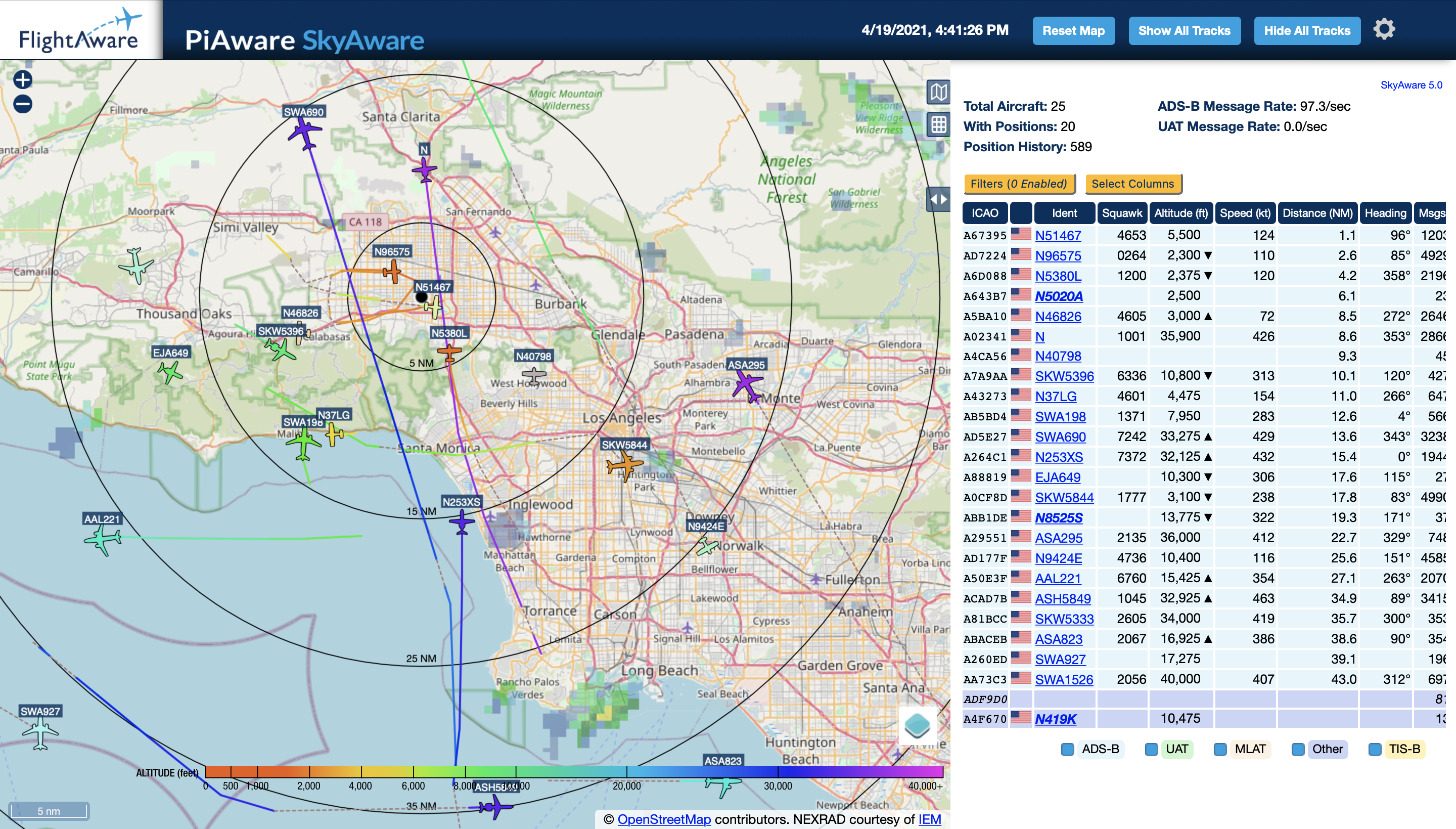
With a Raspberry Pi, a USB ADS-B receiver, and a small antenna in my window, I could see aircraft broadcasting over Los Angeles. I had not known I could build a receiver myself. The appeal was immediate: inexpensive hardware, public radio signals, and a local map showing what it received.
What PiAware is
PiAware is FlightAware’s software for running an ADS-B receiver on a Raspberry Pi and feeding the data back into FlightAware’s network.
ADS-B is the system many aircraft use to broadcast their position, altitude, speed, and identity. Sites like FlightAware aggregate those signals from receivers all over the world. PiAware lets you run one of those receivers yourself, contribute to the larger network, and still see the local data directly on your own device.
FlightAware also gives feeder accounts extra access as a thank-you for contributing data, which is a nice bonus. I was mainly interested in receiving the signals myself.
My setup
I purposely installed PiAware on a Raspberry Pi Zero W so that I could eventually mount it on the roof without introducing a lightning path back into my home network. So far, though, keeping the antenna in a window has worked better than I expected.
Eventually I may install the antenna on the roof. For now, the window setup is good enough that I have not felt much urgency to change it.
What I could see from Los Angeles
The surprising part was range. I am about 21.9 miles from LAX, and even with the antenna sitting in a window, I can often see transponder signals from aircraft on the ground at the terminals.
From my desk, I could follow departures, arrivals, and ground traffic, with aircraft IDs, altitude, and range.
On most days, this little setup averages a 100+/s ADS-B message rate, which seems pretty good for a receiver that is still just sitting inside by the glass.
The parts
This was my parts list at the time. Check FlightAware’s current PiAware setup notes and hardware recommendations before buying anything, because Raspberry Pi availability, receiver options, filters, and antenna setups change.
I have not done an A/B test with or without the filter. I originally bought it because I was in a congested RF area, and it seemed worth having in the chain.
- Raspberry Pi Zero W
- FlightAware Pro Stick Plus
- ADS-B Dual 978 MHz + 1090 MHz Band-Pass SMA Filter
- Proxicast 25 ft Low-Loss Cable
- 1090 MHz ADS-B Antenna
FlightAware has the official PiAware install instructions, so I would start there rather than trust an old parts list from 2021 as a buying guide.
Why this kind of project sticks
Opening the map lets me see nearby aircraft and their reported positions.
I can identify aircraft passing overhead and follow their routes from my window.